beep™ FAQs
Passenger Question
The load of a regular beep™ card cannot be reclaimed once the card is lost. Only the load of the Concessionary card can be transferred for a fee of P150.
Senior Citizen and PWD Passengers can visit any LRT1, LRT2 or MRT3 stations to apply for a concessionary beep cards.
No present facility yet for obtaining a discounted student beep™ cards for use in rail transport. But students can still avail
a discounted Single Journey Ticket (SJT) by presenting a valid school ID or other proof of enrollment.
Please note that the price of the beep™ card may vary depending on the transport partner or operator. For the most accurate and up-to-date pricing, we recommend inquiring directly with the respective operator.
beep™ cards are being sold at different prices across channels. The government subsidizes the cards sold at the rail lines which explains the price difference.
You may get the balance of your card by doing the following:
- Download the beep™ app in the Apple App Store, Google Play Store, or Huawei App gallery. The app is free and you can register up to 5 cards. Aside from your balance, you will also see the transactions made using the registered cards. You can update your balance real-time if you have an NFC enabled phone.
- Tap your card in the reader of the Ticket Vending Machine (TVM) found in the 46 stations of the LRT and MRT.
- Approach any of the teller windows in any of the stations of the LRT and MRT.
- Approach the designated beep™ window or the beep™ booth that offers loading at any of the bus terminals.
- Tap your card on the card reader at selected Uncle John’s and Lawson branches.
The beep™ card aims to reduce time spent in queueing for tickets and streamline transfers from the 3 elevated railways – LRT1, LRT2, and MRT3 – as well as P2P and provincial buses, ferries, and modern jeepneys. It is also safe since beep™ transactions are contactless and will require less time to transact since purchases are automatically deducted from the card.
Using beep™ gives you a hassle- free and a more convenient payment experience. No need to carry cash or fumble for coins, and you pay the exact amount every time, avoiding short change. Enjoy seamless travel using one payment card.
beep™ is accepted in Metro Manila’s three elevated railways – LRT1, LRT2, and MRT3 – and can be used for fare payments in a growing number of Point-to-Point (P2P) buses and PUVs nationwide. Outside of public transportation, beep™ can also be used to pay in various selected retail establishments such as Uncle John’s, and Lawson.
Please inform the transport partner driver or any person in charge of the incident. For refunding, please follow the process of the transport partner policies.
Standard beep™ cards are transferable and can be used by whoever is holding the card. Concessionary Cards are personalized and can only be used by the Senior Citizen or Person With Disability whose name appears on the card. Co-Issued Cards are personalized and can only be used by the person whose name appears on the card.
Cards can experience wear and tear over time.
beep™ cards generally have a four year validity, with a one year extension, to ensure that cards used are always of good working condition.
beep™ cards can be purchased from any of the LRT1, LRT2 and MRT3 stations by approaching any of the teller’s booth or using the self-service Ticket Vending Machines (TVMs). You can also purchase beep™ cards from BGC Bus (EDSA McKinley and Market! Market!), One Ayala Terminal, TAS Trans P2P (Pilar Las Piñas and Nuvali Transport Terminal), and Trasierra Terminal at select times only.
We are also available online at the beep official store in Lazada and Shopee. Enjoy a seamless shopping experience ordering not only standard service cards, but also limited edition designs that we offer from time to time.
Cards can be extended one hundred eighty (180) calendar days prior to the expiry date printed on the card.
Any remaining balance on an expired card can be transferred to a new card anytime within twelve (12) months after the expiry date. (For example, if the card is expiring on July 31, 2019, they have until July 31, 2020 to transfer the balance from the old card to a new card). A transfer of balance fee of One Hundred Fifty Pesos (P150.00) will be charged to the cardholder. After this 12-month grace period, any remaining balance on the expired card will be forfeited.
Yes. All beep-partner bus companies now accept applications for beep™ discount cards for Senior Citizens and PWDs (shown below).
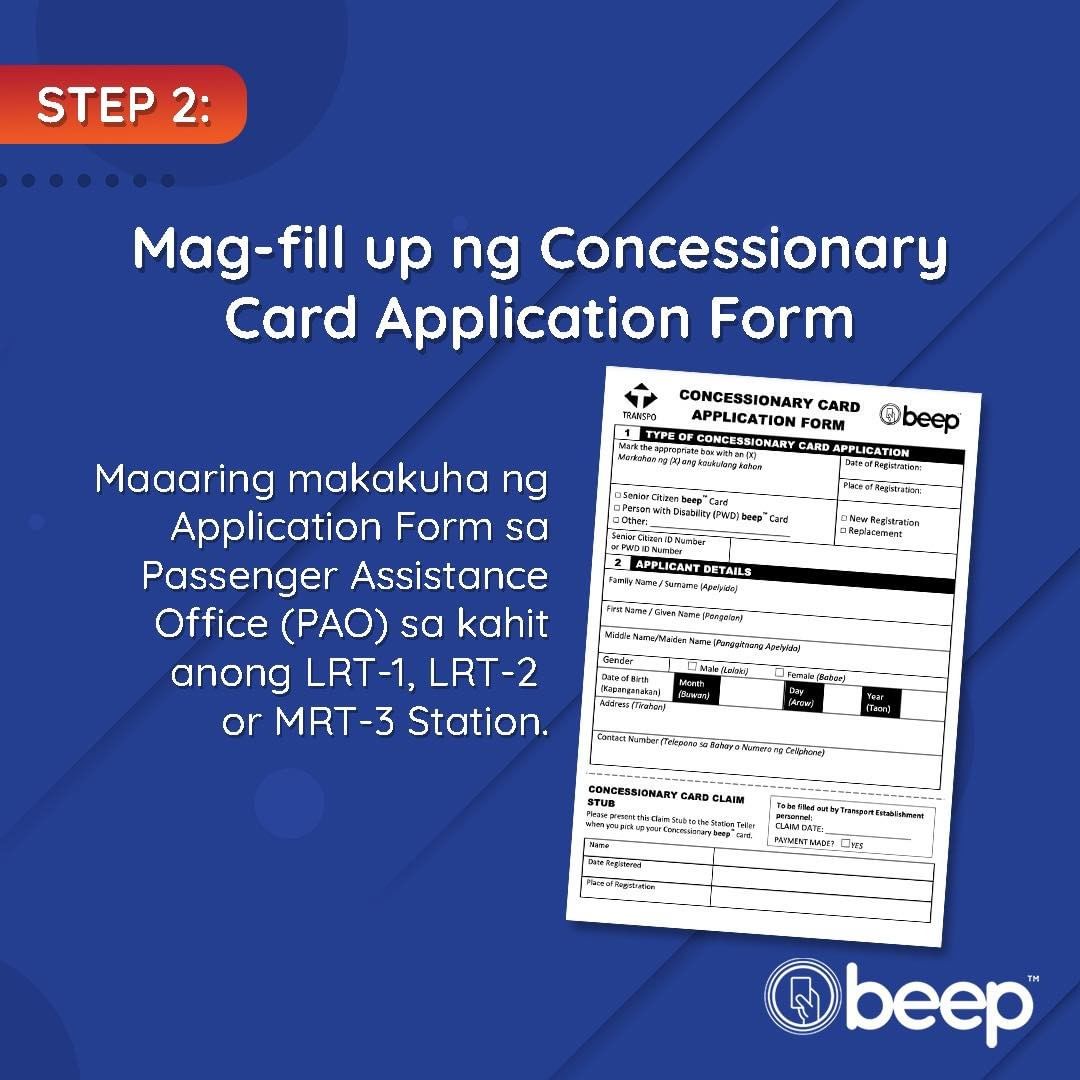
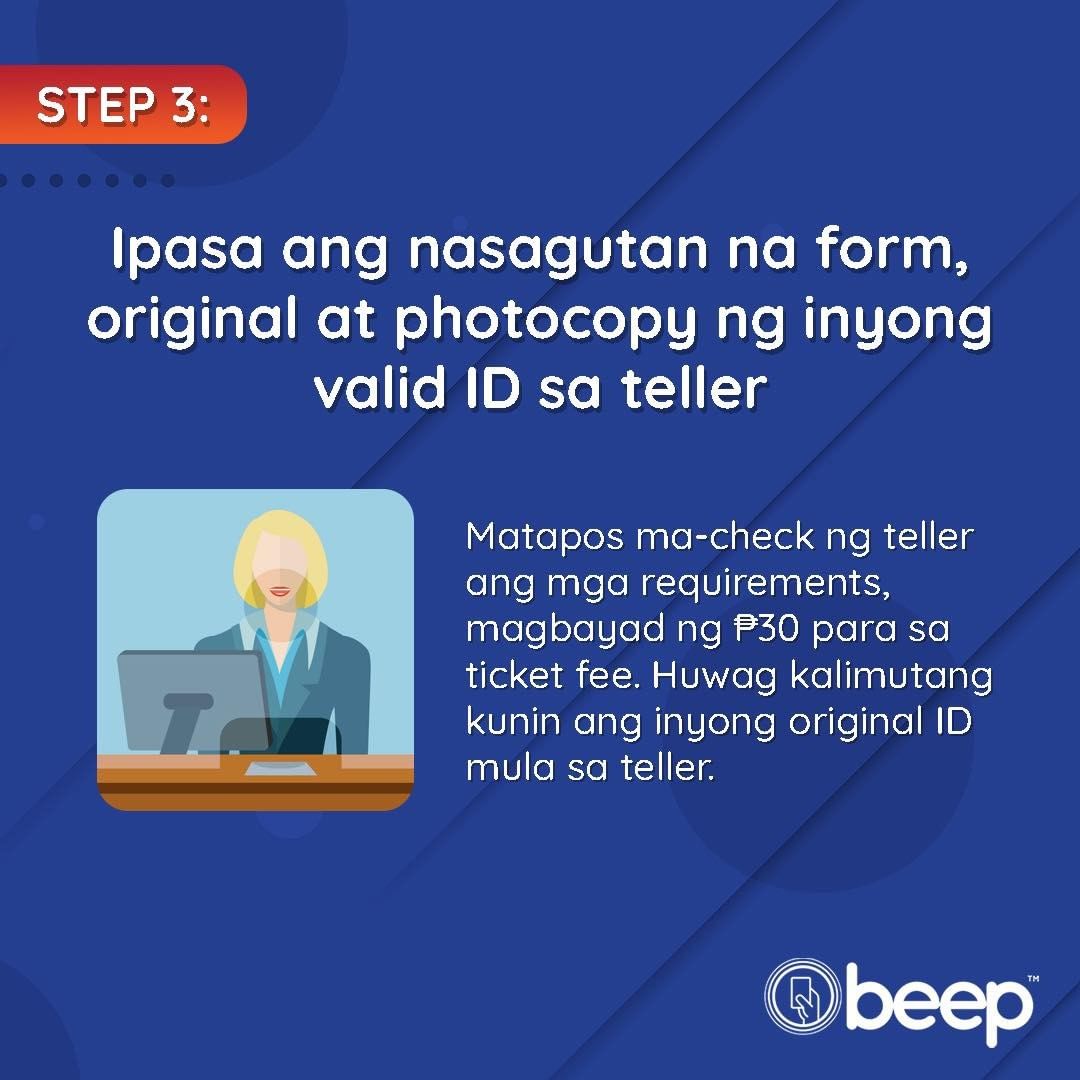
Applicants will just have to fill out a form, pay a processing fee and show a valid Senior Citizen or PWD ID. The personalized cards will be available for pick-up in the location where you applied after up to fourteen (14) calendar days. These cards are non-transferable. Unauthorized use will result in the confiscation of the card.
beep™ Discount Cards for Senior Citizens and Persons with Disability (PWDs) issued through Bus Partners
Only cards issued to any of our bus partners that are found to be defective can be accommodated at the bus terminals or our partner establishments. There is no replacement fee. However, if you wish to transfer the load from the defective card to the new one, a P150 service fee will apply.
For cards bought at the train stations, you may approach any of the LRT1, LRT2, and MRT3 stations from 5AM to 10PM daily, including public holidays so long as they are operational, to request a replacement of your defective beep™ card.
If the card is already expired, the cardholder would have to purchase a new card from the station or from any of our non-rail outlets such as P2P bus terminals accepting beep™ cards.
Yes, you can use beep™ for fare payment in select city buses, like BGC Bus, as well as in majority of the Point-to-Point (P2P) buses. For the complete list of transport partners, please refer to this link: https://beep.com.ph/where-to-use/
Step 1: Look for the beep™ Bus Validator when you enter the bus. This is situated near the coach captain (bus driver) (refer to photo below)
Step 2: Tap your beep™ card on the card reader of the Bus Validator (where the beep icon sticker is). Wait for the light to turn from Amber to Green. The Green light and the beep™ sound will indicate a successful transaction.
Step 3: Take note of your card details (fare deducted and ending balance) which will be seen on the screen upon completion of the transaction.
REMEMBER: DO NOT TAP AGAIN TO AVOID DOUBLE DEDUCTION.NO NEED TO TAP OUT WHEN YOU EXIT THE BUS.
You can check the complete list of our transport partners thru this link: https://beep.com.ph/where-to-use/ or you can also look for the beep™ acceptance sticker on the side or front window of the bus. If it has a beep™ sticker, you can use your beep™ card to pay!
Any type of beep card can be used to any of our transport partners. This includes concessionary cards, those cards used in the train stations and limited-edition beep™ card designs that cater to consumer interests.
We can’t offer blacklisting for regular blue beep cards or limited edition beep cards right now because they are not unique per customer, the ownership can be transferred anytime.
For discounted / concessionaire cards, requests can be made at LRT/MRT stations. Please approach any of the stations and follow their procedures for blacklisting.
We currently do not process refunds for beep™ transactions. You may inform any personnel of the partner bus company of the said breakdown to know their refunding procedure.
Please call our customer hotline (02) 8737 9600 for assistance on the next steps and to report the incident.
Please call our customer hotline (02) 8737 9600 to report any errors that may have occurred during your transaction.
You can load at any of the LRT and MRT stations, passenger terminals of transport partners, and select Qube Locker stations. beep™ cards can also be loaded using self-service kiosks, via beep™ app or via Over-The-Air (OTA) loading partners in digital banking apps and online, such as GCash, Maya, Justpayto, Venio, Posible, and ShareTreats. Just remember to fetch the app from your beep™ card at our e-load stations in train and P2P stations, or through the beep app to complete the transaction.
You can load as much as P10,000 – but take care of your card, once lost, your load may not be recovered.
Follow the procedure provided by the OTA Partners. For the list of OTA partners, click here: https://beep.com.ph/loading-stations/. Follow the instructions provided by the OTA partner.
Once successful, proceed to the beep e-load station to transfer the load to your beep card, or if you’re using an NFC-Enabled phone, just follow the on-screen instructions to receive the load.
Follow the procedure provided by the OTA Partner to process the beep™ load request. This is the first step in the OTA loading process. For the list of OTA partners, click here: https://beep.com.ph/loading-stations/
After successfully processing the beep™ load request in the OTA Partner’s app or website, proceed to any beep™ e-Load Station to officially transfer the load to your beep™ card. You can also fetch the load through the beep™ app.
Right after your successful beep™ load request via digital bank/e wallet, you may already proceed to a beep™ e-Load station or tap your card at the back of your NFC-Enabled phone to claim your load via the beep app.
Once a beep load request is approved and processed by the OTA partner, it cannot be canceled anymore/
Yes, you can continue the process whenever you’re available. Your beep™ load request expires after 180 days.
Yes, you may but you will have to wait 30 minutes for your load to be “fetched.”
If more than 30 minutes have passed from the time you made the request, kindly check if your source account or e-wallet has been debited. If yes, call the OTA partner’s Customer Service to report the issue.
Please call the beep™ Customer Service Hotline at (02) 8737 9600 to report the incident and get assistance.
The beep e-Load Station is a device owned and operated by AF Payments Inc. (beep™) and the OTA Partner. The transport operator is not involved in the operations of this service so they will not be able to help you regarding the issue. Please call our Customer Service Hotline at (02) 8737 9600 to report the incident and get assistance with the next steps.
The discount only applies when you use the concessionary cards, and not when loading.
The excess amount loaded on top of the 10,000 maximum limit can be seen as “pending” when you check your card’s balance in our e-loading stations. Such excess will automatically be credited once the previous load was used up or a portion of the balance.
When you tap your beep card on the beep e-Load Station, it will show you the current balance on your card and all your pending beep load requests. If you exceed the Php10,000 limit, you can claim the remaining amount the next time provided you have used up all or a portion of your balance.
There are convenience or service fees that vary per OTA (Over-The-Air) Partners. It can be seen in the cost breakdown before you confirm the transaction.
You may check the balance of your beep card by tapping your card on any beep reader or by downloading the beep mobile app for free (available in the App Store and Google Play Store).
beep™ QR ticket is a single-use ticket form for public transport using a QR code that meets the QCAT standard published by AFPI. The QR code is a two-dimensional barcode that can be scanned by a fare collection device to determine whether the ticket is valid. Currently, beep™ QR tickets are pre-paid only. AFPI developed the beep™ ticket system as a contactless payment solution for mobile phones and paper tickets.
beep™ QR tickets can be purchased using the BPI Mobile App, PayMaya, and GCash app. On the buy beep™ QR ticket page, user enters the details of his trip, e.g. origin, destination, route, and pays the corresponding fare amount. The ticket is then stored in the app, ready to use. Passengers should be reminded not to fold or crumple the ticket which needs to be scanned when boarding and alighting the public transport vehicle.
beep™ QR tickets purchased using digital wallets or banking apps may have different expiry periods depending on the QR ticket issuer. Most mobile phone QR tickets are valid for use within 24 hours from the date and time of purchase. Unused tickets will be forfeited. Passengers are reminded to always check the validity period that is shown on the ticket to ensure that it is valid at the time of travel. They also need to ensure that the ticket is still valid when alighting the vehicle.
QR tickets are valid for one-time use, depending on the validity of the QR ticket. If you encounter potential fraudulent use of beep™ QR tickets, contact AFPI immediately for investigation.
Once the passenger scans the QR ticket on the validator, there will be a prompt that notifies the driver of the error (i.e. invalid destination). When this happens, the following steps will be applied:
Teller/Driver will check the QR ticket and advise you to pay the additional fare amount to the off-board teller The driver will also inform the controller to assist the passenger in paying the fare discrepancy. Controller will assist passenger to beep™ teller to settle the balance. Teller will then scan the QR ticket on the loading device to tag the revenue to the correct bus/ operator. There is no need for the passenger to return to the bus to scan the correct QR ticket)
Once the passenger scans the QR ticket on the validator, there will be a prompt that notifies the driver of the error (e.g. invalid origin due to boarding at the wrong stop). When this happens, the following steps will be applied:
Driver must check the invalid QR ticket and advise the passenger to buy a new ticket at the off-board teller at the bus stop. The driver will also inform the controller to assist the passenger in buying a new ticket. The controller will assist the passenger to beep™ the teller to buy a new ticket. Teller will issue a new ticket to the passenger and collect the fare payment. “Invalid destination” can also occur when the passenger alights earlier than the paid for destination. The driver should check the destination station on the ticket and let the passenger go if the current station is earlier than the paid for station. Additional fees only apply if the current station is further down the route than the paid for station.
The QR ticket is the responsibility of the passenger and they are reminded to take care of it for the duration of the trip. If lost, the bus operator’s handling for lost bus tickets apply. However, if the QR code on the ticket is unreadable, the inspector can also check the trip details indicated on the ticket for confirmation.
This may be caused by having no active internet connection, i.e. no signal or no data available. The passenger should be advised to connect to the internet to receive the updated QR ticket.
If the QR validator (TPS530) is broken, it is up to the teller if they will accept the ticket or will require use of beep™ or cash.
You may contact AFPI, through hotline number (02) 8737-9600, mobile numbers 0917 5121319/ 0998 5819675 (available Mondays to Sundays from 5am to 11pm), and/or by sending an email to customer.info@afpayments.com.
This offer applies to beep™ cards that have a load balance of at least ten pesos (P10) and has an expiry date within 180 days before the expiry date printed on the card (i.e., date shown/printed on the back of the card) Concessionary Cards are also eligible (even if the balance on the concessionary card is less than P10).
The expiry date of expiring beep™ cards that are tapped on the Express Renewal terminal will be extended by one (1) year. The new expiry date will be based on the same month as the original expiry date with one year added (for example: the new expiry date for a card valid until end June 2023 will be the end of June 2024).
Expiring or expired cards can only be extended once.
Cards can be extended one hundred eighty (180) calendar days prior to the expiry date printed on the card or encoded on the contactless chip embedded in the card (for example: cards that are valid until the end of June 2021 can request for an extension from 1 January 2021 to 30 June 2021).
No, there will be a fee of ten pesos (P10) for the card extension service. This fee will be deducted from the card balance while the card expiry date extension request is being processed. Cards that are removed from the expiry date extension device before the fee can be deducted may be blacklisted and blocked by AF Payments Inc. (“AFPI”) at the latter’s discretion.
The P10 fee is to cover for the cost of processing the card extension request. You will note that the Php10 fee is still less than the Php150 transfer of balance fee (i.e., to transfer load from the old card to a new one) or the P30 card issuance (?) fee charged to buy a new card altogether. However, Concessionary Cards (Senior Citizen and PWD beep cards) can be extended free of charge.
Step 1: Check if your card expires on or before Dec 2021. Cards can be renewed one hundred eighty (180) calendar days prior to the expiry date printed on the back of the beep™ card.
Step 2: Visit any LRT 1, LRT 2, or MRT 3 station where the Express Renewal terminals are deployed.
Step 3: Place your card on the Express Renewal terminal and follow the instructions on the device.
Note: If the extension process is successful, you will get a printed receipt indicating the new expiry date of your beep™ card. Please note that the extension can only be done once.
The following cards will not be eligible for expiry date extensions: beep™ Cards with less than P10 load balance (excluding Concessionary Cards)
Blacklisted Cards
Cards whose expiry date that does not fall within the period specified for the extension (i.e., 180 days prior to the printed expiry date on the card)
Timebound[1] Concessionary Cards
Special Purpose[2] Cards
[1] Timebound concessionary cards have a time limit in which the concessionary cardholder is eligible for the concessionary card.
For example, Student cards may be timebound whereas Senior Citizen or Person With Disability (PWD) cards are not. [2] For example, staff cards of rail employees
The beep™ app was developed to help you, our cardholder, better manage your card by offering the following services: Inform you of your card balance. Show your transactions made using the card.
Allow you to register up to 5 cards so you can monitor your load and usage.
Yes. All cards with beep™ chip can be registered (beep™ card), including beep™ co-branded cards, Concessionary beep™ card, Student discount card, and ID’s with the beep™ chip.
It will work on smartphones with the following iOS and Android operating systems: at least Android v5.0 (Lollipop) and at least iOS v9.0.
There may a slight delay in the balance shown as data is uploaded periodically throughout the day. The time and date of the card balance will be shown in the app.
There may a slight delay in the transactions shown as data is uploaded periodically throughout the day.
There are several ways you can recover the data in your beep™ app if you lose your mobile phone: You can still access your beep™ app through a different mobile phone by entering your account details and PIN. If you forgot your previous mobile #, you can recover your account through the registered recovery e-mail. If recovery e-mail is not available, you can key-in at least one of your registered beep™ CAN and your registered First Name and Last Name in your previous account. After this, you need to provide the answer to the security question you provided. It is important, therefore, to ensure that you remember your nominated recovery e-mail, at least 1 registered CAN in the App, your registered First Name & Last Name and your answer to the security question to be able to recover the data in your beep™ app in case you lose your mobile phone.
You can reset your PIN by entering the OTP code that will be sent to your mobile # and then by answering the security question.
The Total Balance shown in the Home Page/Tab is the total accumulated balance of all active registered cards.
Click the “Cards Portion”, choose a card you want to delete. If your card is Blacklisted, Expired, or Unverified, just SWIPE THE CARD to delete. Otherwise, you may just tap the card then select “Delete this card”. Deleted card will no longer be seen in your monitored list. This card, however, can still be used (provided it has not yet expired) but will no longer appear in your beep™ app.
You may check the balance of your beep™ card by tapping it at the back of your NFC-enabled phone.
Click on “Buy beep™ Load”. Select the card you want to purchase a load then key-in your desired amount. On the payment window, kindly input your card details. Once successful, return to beep™ app and tap your card on a loading station, or if you’re using an NFC-ready device, just follow the on-screen instructions to receive the load.
Frequently Asked Questions (FAQs) About The BEEP™ Mobile Application
Overview
The beep™ mobile phone-based application or simply the beep™ app is designed by AF Payments Inc. (AFPI) as a handy, user-friendly companion for beep™ cardholders to check their card balance, load their card, monitor card transactions, buy QR tickets for select public transport, while earning points for rewards.
The beep™ app offers a fast and convenient way to streamline your daily commute and lifestyle habits. Check your beep™ card balance in real time to know if you have sufficient funds for your next journey. You can track your most recent card transactions and how much you have spent. You can reload or top up your beep™ card anytime, anywhere without having to queue up at a station or ticket vending machine. For select bus transport services, you can buy a QR ticket ahead of time for hassle-free boarding. By registering to activate the beep™ cash or digital wallet on the beep™ app, you don’t have to carry cash to pay for merchandise, load your beep™ card, or transfer funds to other digital accounts.
Yes. The app has built-in features to ensure secure transactions. For instance it uses encryption and secure channels to protect your data. Just make sure you don’t share passwords. By regularly monitoring your transactions and card balance, you can check for any discrepancies. You may also contact the beep™ app customer hotline (02) 8737 9600, Smart: +63 998 581 9675, Globe: +63 917 512 1319 or you can also e-mail us at: customer.info@afpayments.com for any other specific concerns.
The beep™ app is free to download on your smart mobile phone. However, certain fees and charges may apply for certain in-app transactions or when using other digital wallets.
Features & Functions
The beep™ app offers the following value-adding services:
(1) Real time card balance check – this feature enables users to immediately check if there is sufficient balance on their beep™ card(s) for a seamless and hassle-free travel experience.
(2) Card transaction monitoring – users can identify and track beep™ card transactions, and prompt any suspicious activity for further investigation, helping mitigate the risk of financial crimes or scams.
(3) beep™ Card Loading/Fetching – allows users to load the beep™ cards enrolled in the app anytime, anywhere without having to line up at the stations, terminals or ticket vending machines.
(4) Purchase QR tickets – users of the app can procure beep™ QR tickets ahead of time to immediately board select bus transport services, providing enhanced security and contactless entry without having to queue up at the terminal or ticket booth to pay for fares.
(5) Earn Points and Redeem Rewards – the more you use your beep™ card, the more points you earn which can be redeemed for extra load or buy a beep™ QR ticket to pay for fares in select buses.
Getting Started
Just follow the steps below to download and start using the beep™ app:
Step 1: Head to the App Store (iOS), Google Play Store (Android) or Huawei AppGallery and search for the beep™ app and download for free. Make sure you have a stable Internet connection while downloading to avoid any delays or disruptions.
Step 2: Create an Account. Once downloaded, open the app and sign up using your mobile number and email address. You will receive a verification code to confirm your identity. You will also need to assign a 6-digit Personal Identification Number (PIN) to log-in.
Step 3: Register your beep™ Card(s). Tap “Add Card” and follow the prompts to link your physical beep™ card. You can register as much as five (5) cards in your app. Make sure you have the 16-digit Card Account Number (CAN) found at the back of the card when enrolling your beep™ card(s).
Step 4: You can start exploring and using the beep™ app features and services such as check balance, card loading, transaction monitoring, among others.
To enjoy the full functionality and features of the beep™ app, your phone should be NFC-enabled. NFC stands for Near Field Communication, a wireless technology that allows two devices to communicate when they are very close to each other (i.e., within a few centimeters apart). Even if your phone has no NFC capability, you can still use the beep™ app if your device meets the minimum operating system (OS) requirements, although not all of the app’s functionalities may be accessible.
It’s best to check if your device meets the following technical specifications:
- For Android phones (e.g., Samsung, Xiaomi, OPPO, Google/Pixel, Vivo, etc.), the operating system (OS) version should be at least Android 6.0.
- For iOS (e.g., iPhone), the OS version should be at least iOS12. iPhone 7 or newer models are automatically NFC-enabled.
- Your phone, whether running on Android or iOS operating system, should also have available storage capacity of at least 300MB.
To check if your Android phone has NFC capability and to enable it:
Step 1: Open <Settings> on your phone.
Step 2: Tap <Connected Devices> or <Connections> (depending on the phone brand or Android OS version).
Step 3: Look for “NFC” or “Near Field Communication”. You can use the Search bar at the top of the Settings icon.
Step 4: If you find NFC, toggle it <ON> to enable.
As of this writing, the following mobile phone manufacturers offer NFC-enabled models: Apple, Asus, Google, Honor, HTC, Huawei, LG, Motorola, Nokia, OnePlus, Oppo. Samsung, Sony, Vivo and Xiaomi. For a detailed list of specific models that support the beep™ app, click <here>.
Yes. AFPI is compliant with the relevant provisions of the Data Privacy Act of 2012 (also known as Republic Act 10173) when handling personally identifiable information (PII). For more information about the beep™ app Privacy Policy click <here>.
It means your beep™ card(s) is enrolled in the beep™ rewards program. To know more about beep™ rewards, click here.
Using The App
Follow these steps:
Step 1: Select the <Buy beep Load> icon from the beep™ app dashboard.
Step 2: Input the last 10-digits of the 16-digit beep™ card number (printed at the back of the card) or tap the <Use NFC Scan> option to scan any beep™ card (for NFC-enabled phones). Alternatively, you can select from any of your enrolled beep™ cards. Click <Next>.
Step 3: Select from any of the pre-defined amounts or key-in a different desired amount.
Step 4: Select your preferred payment method.
Step 5: Review and confirm your order.
Step 6: Proceed to payment.
Step 7: You will see a Successful message displayed on screen.
Reminder: After a successful load transaction using your beep™ app, you will need to fetch your beep™ card load in order to use it. Make sure that the NFC functionality on your phone is turned on during loading or fetching of the load.
Load fetching refers to the process of syncing a previously purchased load balance onto your beep™ card through our beep™ partner merchants. There are two ways to fetch your beep™ load:
Option 1: Load Fetching using the beep™ app:
Step 1: Select the <Fetch beep™ Load> icon from the beep™ app dashboard.
Step 2: Hold your beep™ card near the phone’s NFC reader (Note: for Android devices, the reader is located near the back camera; for iPhones, it is near the front camera).
Step 3: Do not to remove your beep™ card while load fetching is in progress and until you are prompted to do so.
Step 4: Upon successful load fetching, the app will reflect the new load balance on the selected beep™ card.
Option 2: Load Fetching at e-Loading Kiosks (or Stored Value Updater) at the Train Stations:
Step 1: Go to any of the beep™ e-loading kiosks at any station at LRT Lines 1 and 2 and MRT 3 (Note: except for the new extension stations, i.e., Marikina and Antipolo at LRT 2, and Redemptorist, Ninoy Aquino, PITX, Mia Road and Dr. Santos stations at LRT 1).
Step 2: Insert your card in the device reader and wait for about 10-15 seconds for loading to complete.
Step 3: Wait for the screen to show your updated beep™ load balance before removing the card from the reader.
Yes. The beep™ load needs to be fetched within one hundred eighty days (180) or six (6) months from date of purchase. Use the app to check your beep™ card balance and use your fetched loads as needed.
No. Unfortunately, the app does not allow for transfers of load from one card to another.
In the <Transaction History> tab, you can filter and view transactions from the past sixty (60) days. For transactions beyond sixty (60) days, please contact our customer service desk (email address) for assistance.
QR tickets, which can be purchased through the beep™ app, can be used to pay for fares in selected bus transport services. QR, which stands for Quick Response, is a two-dimensional barcode that stores information or content for various applications, including but not limited to transport and retail payments. When presented to a device reader or scanner, the QR code directs you to the embedded content and processes payment or allows access, for instance.
Follow these steps:
Step 1: Select the <beep™ QR Tickets> icon on the beep™ app dashboard.
Step 2: Select preferred Mode of Transport (e.g., bus, jeepney, ferry).
Step 3: You will be prompted to select <Operator>, <Route>, <Start Terminal> and <Destination Terminal>.
Step 4: Select desired payment method.
Step 5: Review and confirm your order.
Step 6: Proceed to payment.
Step 7: Take a screenshot of the beep™ QR ticket generated by the app and save it in your photo/image gallery for future use, especially in cases where there is low or weak signal onsite. Remember that QR tickets can only be used once.
When you arrive at the bus terminal or boarding area, simply present the beep™ QR ticket to the QR device reader or scanner located at the terminals or inside the vehicle. At present, beep™ QR tickets can be used in the following bus services:
- BGC Bus
- Clark Loop (Clark Development Corporation)
- San Agustin Transport
- TAS Trans
- UBE Express Inc.
Note: In some bus services, you need to “Scan In” your QR ticket when you board, and “Scan Out” when you get down or alight. In some cases, you will only need to scan once. Please check with the operator.
No. beep™ QR tickets are for one-time use only. You will need to buy a new beep™ QR ticket for succeeding journeys.
Yes, provided that the QR ticket will be used only once and the end-user is aware of the origin (i.e., where to board) and destination (i.e., where to get down) contained in the beep™ QR ticket to avoid any inconveniences during the trip.
Yes, beep™ QR Tickets expire after 24 hours from time of purchase, so be sure to use them before that.
There are several options for doing funds transfer using the beep™ app:
Option 1: beep Cash to another beep Cash account using your Mobile Number:
Step 1: Tap the <Send> Button on the app dashboard.
Step 2: Select the <Express Send> tab.
Step 3: Enter the mobile number of the recipient or select a contact from your own list.
Step 4: Enter your desired amount.
Step 5: Tap the <Next> button.
Step 6: On the Confirmation screen, tap the <Confirm> button.
Step 7: Tap the <Proceed> button when prompted.
Step 8: A success message will appear on the screen if the transaction is completed.
Option 2: beep Cash to another beep Cash account using QR Code:
Step 1: Tap <Send via QR>.
Step 2: Scan the beep Cash QR Code.
Step 3: On the beep™ eMoney screen, enter the amount you wish to send.
Step 4: Tap the <Next> button.
Step 5: On the Payment screen, tap the <Confirm> button.
Step 6: Tap <Proceed> button when prompted.
Step 7: A success message will appear on the screen if the transaction is completed.
Option 3: Bank Transfer:
Step 1: Tap <Bank Transfer>.
Step 2: Select your preferred Bank.
Step 3: Enter the Account Number, Account Name and desired Amount.
Step 4: Tap the <Next> Button.
Step 5: On the <Send> screen, tap the <Confirm> button.
Step 6: Tap <Proceed> button when prompted.
Step 7: Enter your One Time Pin (OTP) and then tap <Confirm>.
Step 8: A success message will appear on screen if the transaction is completed.
Option 4: Using QR Ph:
Step 1: Tap <Scan>.
Step 2: Scan the QR Code.
Step 3: Enter the desired amount you want to send or pay.
Step 4: Tap the <Confirm> button.
Step 5: Tap the <Proceed> button when prompted.
Step 6: A success message will appear on screen if the transaction is completed.
beep™ Rewards
Follow these steps:
Step 1: Go to <My Card> tab.
Step 2: Select the beep™ card you wish to enroll in beep™ rewards.
Step 3: Swipe the selected beep™ card to the left.
Step 4: Tap the “eye” icon to view details.
Step 5: On the <Transaction> screen, tap the three dots (…) found at the upper right corner.
Step 6: Tap <Enroll to Rewards>.
Step 7: Accept the Terms and Conditions.
Step 8: A “Congratulations” message will be displayed on screen.
The more often you use your beep™ card, the more points you can earn. These points can then be converted into beep™ rewards. For every peso spent using your beep™ card, you earn one point. For every 200 points accumulated, you earn one peso which you can redeem to buy beep™ load or save enough points to buy a beep™ QR ticket under the beep™ rewards platform in the beep™ app. You can always check your accumulated points by clicking the beep™ rewards icon and selecting any of the beep™ card(s) you have registered and used, and monitor <History> of transactions.
Follow these steps:
Step 1: Tap <beep™ Rewards> icon from the home screen.
Step 2: On the <Redeem Rewards> screen, choose either <via beep™ Load> and follow steps 3A to 6A; or <via QR Ticket> and follow steps 3B to 9B
Option 1: To redeem via beep™ Load:
Step 3A: Select <via beep™ Load> and enter or select the desired amount to load
Step 4A: Tap the <Next> button.
Step 5A: On the <Previous Details> screen, tap <Confirm>
Step 6A: A success message will be displayed on screen to confirm the transaction.
Option 2: To redeem via beep™ QR ticket:
Step 3B: Select <via QR Ticket>
Step 4B: Select a Transportation Category (e.g., Bus)
Step 5B: Enter the ticket details (e.g., Origin, Destination) and tap <Redeem Ticket>
Step 6B: On the <Preview Details> screen, tap <Confirm>
Step 7B: On the <Redemption> screen, select an account or card with sufficient balance.
Step 8B: Tap <Redeem>
Step 9B: A success message will be displayed on screen to confirm the transaction.
No. Unfortunately, points earned by using a particular beep™ card cannot be transferred to another card.
The current beep™ rewards program will run until November 16, 2025 (subject for renewal). beep™ cardholders can redeem their points prior to that date. We suggest that you regularly check the beep™ app or website for any new updates or notifications to the beep™ rewards program for your reference and guidance.
If you redeem your points to buy beep™ load, the beep™ load will be valid for use within one hundred eighty (180) calendar days from the time of purchase. Beyond this period, the beep™ load will expire. When buying beep™ QR tickets using beep™ points, keep in mind that the QR ticket will be valid within twenty-four (24) hours from time of purchase.
Check out our beep™ rewards terms and conditions for the latest announcements and updates: https://beep.com.ph/beep-rewards/
None. You can use your beep™ as often as you like and earn as many points as you can.
Fees & Charges
Please refer to the following fee matrix:
beep™ App Activity | Applicable Fees and Charges |
Buy beep™ load | (a) Maya Payment Gateway (e.g., Mastercard, Visa, GCash, Maya, Grab Wallet): 3% fee |
Buy QR Ticket | (a) Maya Gateway (e.g., Mastercard, Visa, GCash, Maya, Grab Wallet): 3% fee |
Cash-In Fee | (a) GCash: 2.5%, minimum transaction value PHP 8.00 (b) Other Banks: rates vary (check with your preferred bank) |
Note: The above fees may be subject to change. Please check with your bank, e-wallet or service provider for the latest updates and notices.
Troubleshooting & Tech Support
Here are some basic troubleshooting steps which you can perform if your beep™ app crashes or is unresponsive:
(1) Restart the app. Close the app completely and reopen it.
(2) Check your internet connection. Make sure you have a stable mobile data or access to a Wi-Fi hotspot or connection.
(3) Update the app. The app’s version may be outdated. Go to Google Playstore or Apple App Store and check if there are any recent updates to the app. Follow the steps to get the latest updates, when and where applicable.
(4) Restart your device. A simple phone restart (on/off) or refresh can fix many app-related issues.
(5) Clear Cache (for Android phones only). Go to your phone’s Settings and follow this sequence: Settings > Apps > beep™ > Storage > Clear Cache.
(6) Re-install the app. Uninstall and re-install the beep™ app to ensure you have the latest version and a fresh setup.
If any or all of the following interventions don’t seem to address your particular concern, feel free to contact beep™ Customer support Tel: (02) 8737 9600 Smart: +63 998 581 9675 Globe: +63 917 512 1319 or e-mail add: customer.info@afpayments.com and be ready to provide essential details such as: (a) your device model and OS version; (b) screenshot of the error message (if available); and (c) time and date of the crash/incident. Follow the instructions accordingly.
First, you may want to check on the validity of your beep™ card. The beep™ app only recognizes the original expiry or validity date, which is printed at the back of your card. We recommend that you purchase a new beep™ card and register it in the app to fully utilize the app’s features and services and to avoid any further inconvenience.
Follow these steps:
Step 1: Open the beep™ app and go to <My Cards>.
Step 2: Select the card and the corresponding Card Account Number (CAN) that you wish to remove or delete.
Step 3: Swipe left and click the trash icon.
Step 4: A success message will be displayed on screen to confirm your action.
Make sure that you have used your new beep™ card at least once so you can start seeing transactions on the app. The app will be able to show the 60 latest card transactions at any time.
In the log-in page of the beep™ app, you can tap the <Forgot PIN> text/button. Tap it and enter your mobile number. You will get a One Time Pin (OTP) to verify your new 6-digit PIN. Once there is a successful PIN change, you can now use your new PIN. Make sure you keep track of your PINs to avoid any inconvenience.
Please contact our customer service to report the incident and request for further assistance and/or guidance.
You can contact our customer hotline Tel: (02) 8737 9600 Smart: +63 998 5819 675 Globe: +63 917 5121 319 or e-mail add: customer.info@afpayments.com to report your concern. You can also request to blacklist the card(s) in question to avoid further unauthorized card transactions.
Any remaining load on a blacklisted beep™ card can be transferred to a new replacement card subject to applicable fees and charges. Check out our beep™ terms and conditions: https://beep.com.ph/terms-and-conditions/ for more details or call our customer service hotline for further assistance.
Contact our customer service hotline at (02) 8737 9600; via Smart: +63 998 581 9675 or Globe: +63 917 512 1319, or send us an e-mail at customer.info@afpayments.com to report your concern and prompt an investigation (e.g., confirm that the card has indeed been charged twice). Please be ready to share with us the necessary information such as the card account number (CAN), the date, time, and location of the incident, and other pertinent information to facilitate our investigation.
No. It is not possible to log in to the same beep™ app account on two or more devices at the same time.
If you have access to the e-mail address that you used to register your beep™ account, you log in to your beep™ app account on another device using the same e-mail address to restore your access. However, if you do not recall your e-mail and/or your password to register your beep™ app account, please contact our customer service hotline for assistance.
For all other concerns, our customer service hotlines are open daily (Monday to Sunday) from 05:00 AM to 11:00 PM, including holidays. Alternatively, you can reach us via e-mail at customer.info@afpayments.com and we will get back to you as soon as we can.
The price of the cards may vary depending on the type of card you need. We can provide you the following types of cards: Identification Card for School or Corporations
- Retail Card
- Co-branded Card
- Advertising Card
- Limited Edition Card
In the case of School or Corporate IDs, the card does not include printing to maintain the confidentiality of student and employee records. In consideration of the Data Privacy Act (RA 10173) and other related government regulations, we prefer not to store such information in our database. To learn about the details of these cards, we suggest leaving your name, contact number, and email address. One of our Business Development team members will contact you as soon as we receive your contact information.
To avail of the standard price per card, the minimum order quantity (MOQ) is 1,000 cards for ID cards, and 10,000 for Advertising or Co-Branded cards. We can still accommodate orders with quantities lower than the MOQ; however, the price is typically higher than card orders that meet the MOQ.
To learn about the details of these cards, we suggest leaving your name, contact number, and email address. One of our Business Development team members will contact you as soon as we receive your contact information.
The typical card production cycle, from approval of card design/proofing to actual production and delivery, takes a total of eight (8) weeks. For rush orders, we would have to confirm the availability and capacity of our card suppliers before we can commit to a delivery schedule. Should card suppliers approve the rush orders, we can accommodate them, but the price per card will be higher since production entails additional resources.
The beep™ card contains other functionalities which a simple RFID card may not have. We can check if your gates are compatible with our beep™ cards.
Note: Gates must be compatible with NXP Mifare Desfire EV1 or NXP Mifare Classic to be able to read beep™ cards.
We suggest to kindly leave your name, contact number, and email address. One of our Business Development team members will contact you as soon as we received your contact information. They will be more than glad to answer all your questions.
A beep card is valid for 4 years with an option to extend for 1 year.
There is no minimum load requirement
Some of the conductors’ tasks and responsibilities can be repurposed; AFPI can help assess if conductors are necessary in the routes they are serving. Some operators are quick to remove the conductors but AFPI would know better (based on previous deployments and experience with other operators)
Allow us to study your route and understand your operations first in order for us to come up with a customized proposal, with corresponding costs based on your requirements and operational considerations.
The drivers will be given adequate training, including basic device troubleshooting and issue escalation procedures, so they will know what to do when the device is not functioning.
If the basic troubleshooting does not resolve the issue, the driver will be instructed to make a service call and report the incident for investigation. In addition, spare devices will be issued/endorsed to the operator (approximately 10% of total devices deployed), which can be used to replace the defective units so that operations will not be hampered.
Training sessions are regularly given to key personnel that use the system; these include the frontliners (drivers, conductors, tellers, inspectors) and back-end personnel/staff (Accounting, Finance, Operations).
AFPI is the only company that has extensive experience in doing ticketing and automated fare collection, as evidenced by our work on the rail lines. No other company has successfully implemented such a system in the country to date. Our interoperability, the ability to use the beep™ card with other modes of transportation (LRT, P2P Buses, modern PUVs, ferries) nationwide also gives our cardholders flexible options to use the card on supported transport stations and retail stores across the country. Our beep™ card base continues to grow with more than 10.3 million cards to date, with more monthly as we forge new partnerships and stakeholders.
Our devices are not Point-of-Sale (POS) machines, thus they do not issue Official Receipts (OR) and do not require us to disclose any information generated by the system to the BIR. As a ticketing system, our devices are registered with the BIR as a Special Purpose Machine (SPM).
We also have a Non-Disclosure Agreement (NDA) with the Operator, which prevents us from disclosing any information to external parties without the expressed permission of our partner.
The value of interoperability is best realized when different parties do different activities within the ecosystem. In simplistic terms, if you are a user of beep™ AFCS system, you do not need to take on the responsibility of loading and selling of cards, as other participants in that interoperable ecosystem will take on that responsibility.
There will always be cash transactions no matter how sophisticated the system. Our devices can facilitate multiple forms of payments, including cash, as there will always be a portion of customers that prefer cash payments over any form of electronic payment.
Yes. Our solutions are already being implemented in several points nationwide – in jeepneys, buses and ferry terminals.
We are actively supporting the government’s initiatives such as the PUV Modernization program, the bidding for P2P routes, among other noteworthy projects.
We offer the first and only nationwide interoperable AFCS that is fully compliant with DOTr’s Transpo standards and specifications. The same standards used in the Rail AFCS is what we use in other modes of transportation, so passengers can use the same beep™ card when traveling without having to carry another fare card.
No, the SARA device is a plug-and-play device. You only need to connect the it to a power source to activate. The cashiers/frontliners only need to enter the desired amount, and ask the customer to tap his/her beep™ card on the same device to facilitate the transaction.
You also have the option to add a printer to go together with your device, and it also just needs to be connected to a power source. There is no need to integrate the functionalities of the SARA device to the existing POS.
The cashiers/frontliners will be given adequate training, including basic device troubleshooting and issue escalation procedures so they will know what to do when the device is not functioning.
If the basic troubleshooting does not resolve the issue, the store personnel will be instructed to make a service call and report the incident for investigation. Spare devices will be issued/endorsed to the operator (approximately 10% of total devices deployed, but subject to their final commercial terms and conditions), which can be used to replace the defective units so that operations will not be hampered.
Training sessions are regularly given to key personnel that use the system. These include the frontliners (drivers, conductors, tellers, inspectors) and back-end personnel/staff (Accounting, Finance, Operations).
Yes. Our system generates transaction reports that will allow for settlement and reconciliation, and the information contained therein can be used for other purposes such as sales tracking, trends analysis, and operational improvements.
Settlement is done using the “t+1” principle, i.e., transactions that transpire today (prior to the cut-off time) will be settled tomorrow (provided the next day is a working day) and is based on mutually agreed business rules.
If you have a BPI account, there are no bank charges for settlement transactions. Otherwise, you can negotiate with your bank to waive any existing fee for bank-to-bank transfers.
We have a Merchant Service Desk (MSD) open everyday from 5AM to 11PM to answer all your inquiries – including incident reporting, device troubleshooting, and other concerns.
Aside from the ticket vending machines (TVMs) or teller booths at train stations (LRT 1, LRT 2 and MRT 3), cards can be loaded through the beep™ app, selected Ministop branches, selected Chinabank ATMs, and Over-the-Air (OTA) Loading BPI, Maya, Eon by Unionbank, Akulaku, Justpayto, ANDFinancing(Venio), PosibleNet, Share Treats and SMS loading through Load to Beep (G Gateway). There are also self-service beep™ loading kiosks located in transport hubs and other strategic areas.
Frequently Asked Questions (FAQs) for Concessionary Card
Application and Issuance in Rail Stations
(as of 01 October 2025)
Legend:
CCC: Concessionary Card Counter
CCIP: Concessionary Card Issuance Project
CCP: Concessionary Card Processor
Note: For purposes Concessionary beep™ Card, Concessionary Card, White beep™ Card and Discount beep™ Card are accorded the same meaning and refers to the contactless Stored Value Card (SVC) or fare media bearing the discount for eligible patrons.
Overview
The Concessionary Card Issuance Project (CCIP) is an initiative by the Department of Transportation (DOTr) in cooperation with the three (3) light rail transit (LRT) operators (i.e., Light Rail Manila Corporation for LRT 1, Light Rail Transit Authority for LRT 2 and DOTr-Metro Rail Transit 3 for MRT 3), and the Automated Fare Collection System (AFCS) service provider, AF Payments Inc. (AFPI), to streamline the process for obtaining concessionary beep™ cards at train stations for eligible applicants or concessionary patrons, i.e., Senior Citizens, Students, and Persons with Disabilities (PWDs).
The CCIP is designed to replace the previously established process of manually filling out an application form at the train station and waiting for the release of the concessionary card with on-the-spot printing and issuance of the same (subject to an onsite verification process). Whereas before the concessionary beep™ card is limited to Senior Citizens and Persons with Disabilities (PWDs) only, the CCIP will now include students who are enrolled in the current school year.
Concessionary beep™ Card holders automatically get a fifty percent (50%) train fare discount through a “tap-in, tap-out” mechanism, i.e., tap the card against the reader to enter through one of the automatic gates and tap the card again to exit a station.
For the schedule of discounted fares for each line, please refer to the Fare Matrix posted at each station or approach the station teller for further assistance.
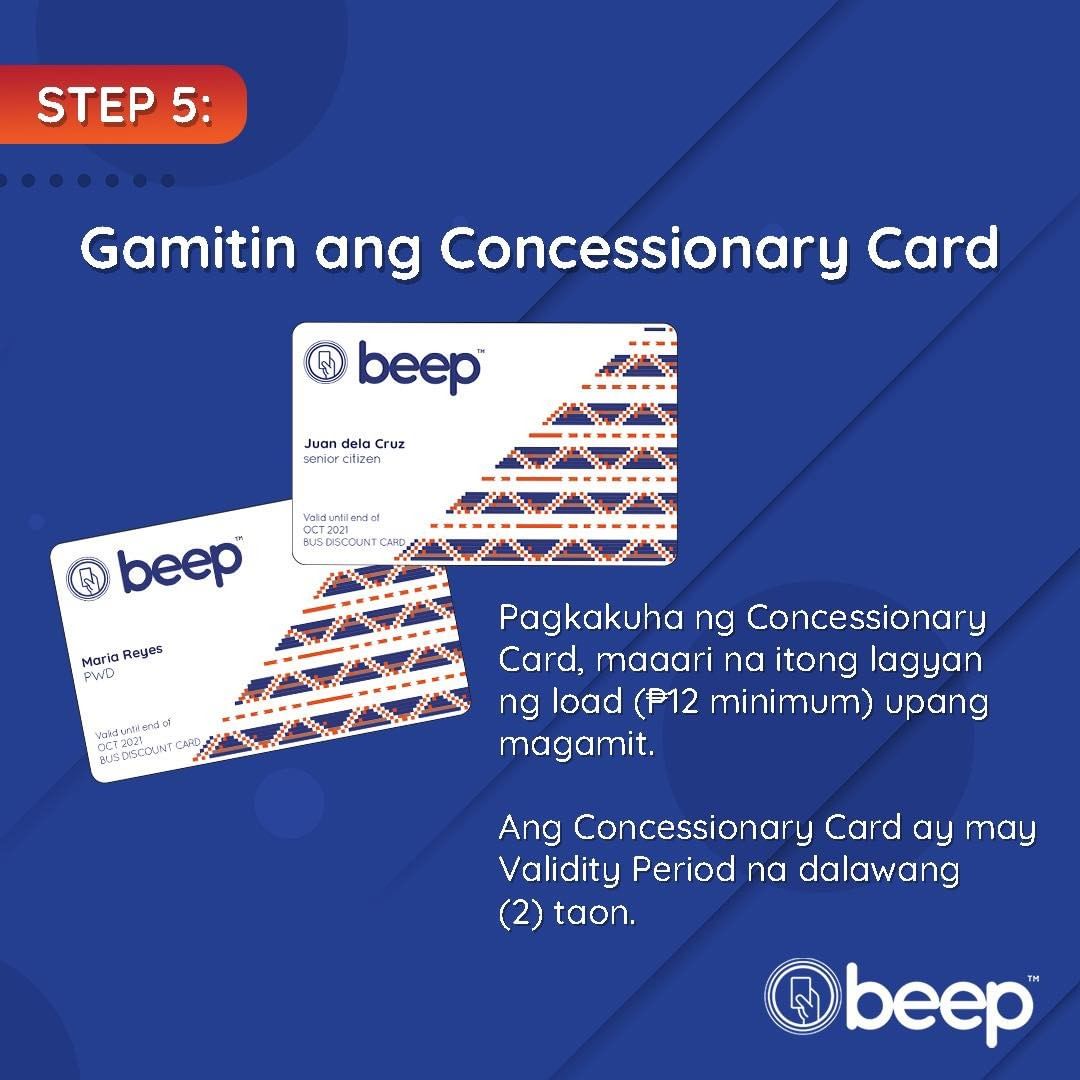
Concessionary beep™ cards are valid for four (4) years from the date of issuance. The validity period is printed on the beep™ card.
Seniors and PWDs can avail of the 50% fare discount for as long as their concessionary beep™ cards are valid. However, students would need to renew the fare discount privilege on their beep™ card every year while they are still enrolled in school, since the discount product is only valid one (1) year from date of issuance, subject to applicable fees. Students can still use the same concessionary beep™ card for its entire validity period.
Application Process
Upon arrival at the station, please proceed to the Concessionary Card Counter (CCC) and get a queuing number. Please refer to the queuing guidelines before proceeding to the application proper, consisting of the following steps:
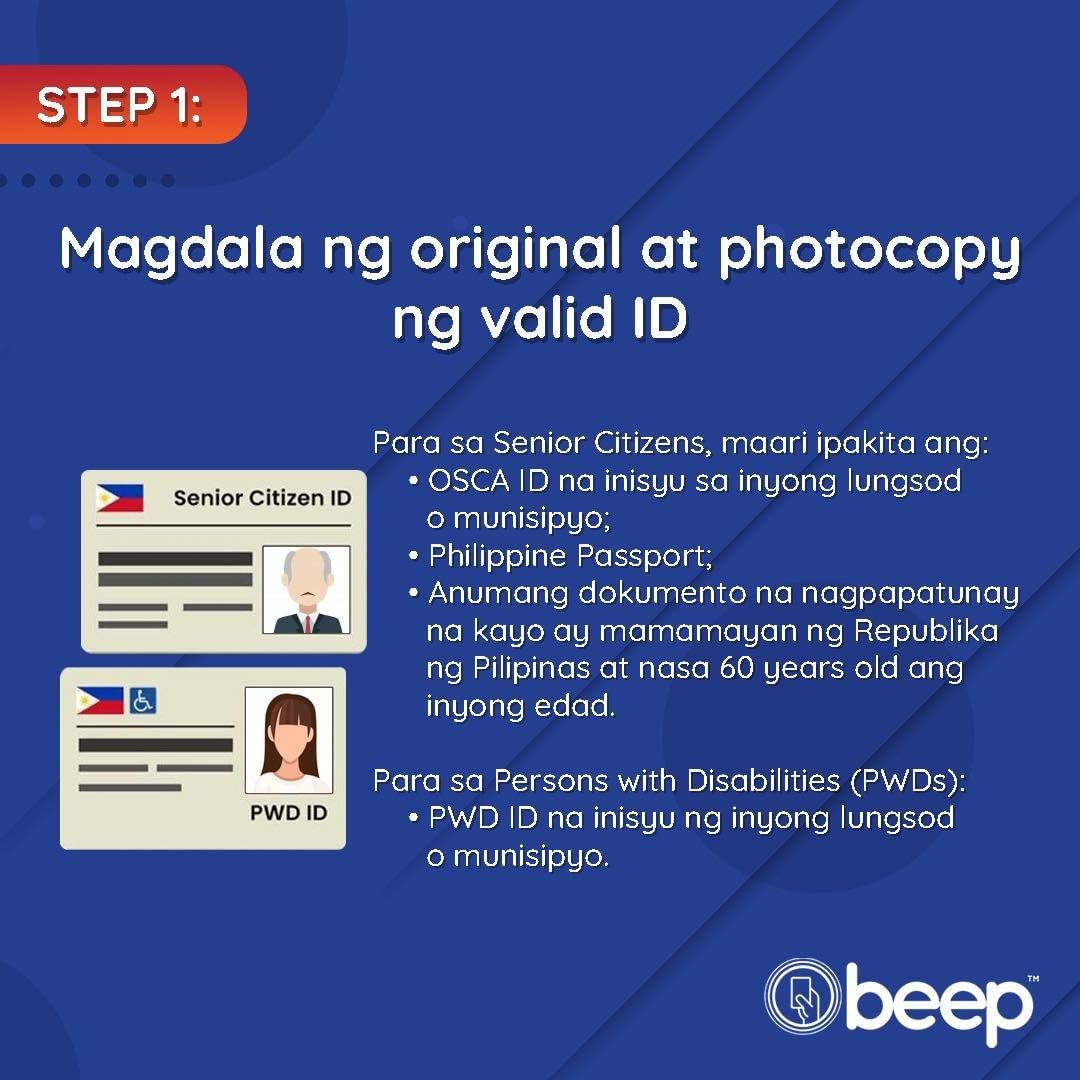
Step 1 : Present a Valid ID – to show proof of eligibility. The Concessionary Card Processor (CCP) will then verify the name and particulars of the applicant on the card database to confirm that there are no duplicate or existing entries.
Step 2 : Encoding and Image Capture – personal information and a camera-capture image will be entered into and verified by the Concessionary Card database. Duplicate entries will be rejected.
Step 3 : Sign the Acknowledgement Form – this is to confirm accuracy of captured information, indicate adherence to the terms and conditions of the concessionary card and give consent to handling of personal information under applicable laws.
Step 4 : Pay a One-Time Fee of P30.00 – only cash payment will be accepted.
Step 5 : Card Printing and Issuance
No. There is no online application option at this time. Instead, please proceed to any Concessionary Card Counter (CCC) located at any train station of LRT 1, LRT 2 or MRT 3. Please bring your valid ID so you can personally apply for your concessionary beep™ card onsite.
Each train station has a dedicated CCC to process concessionary card applications. Just follow the steps and get your card right away. Please be reminded that applications will be processed on a first-come, first-served basis.
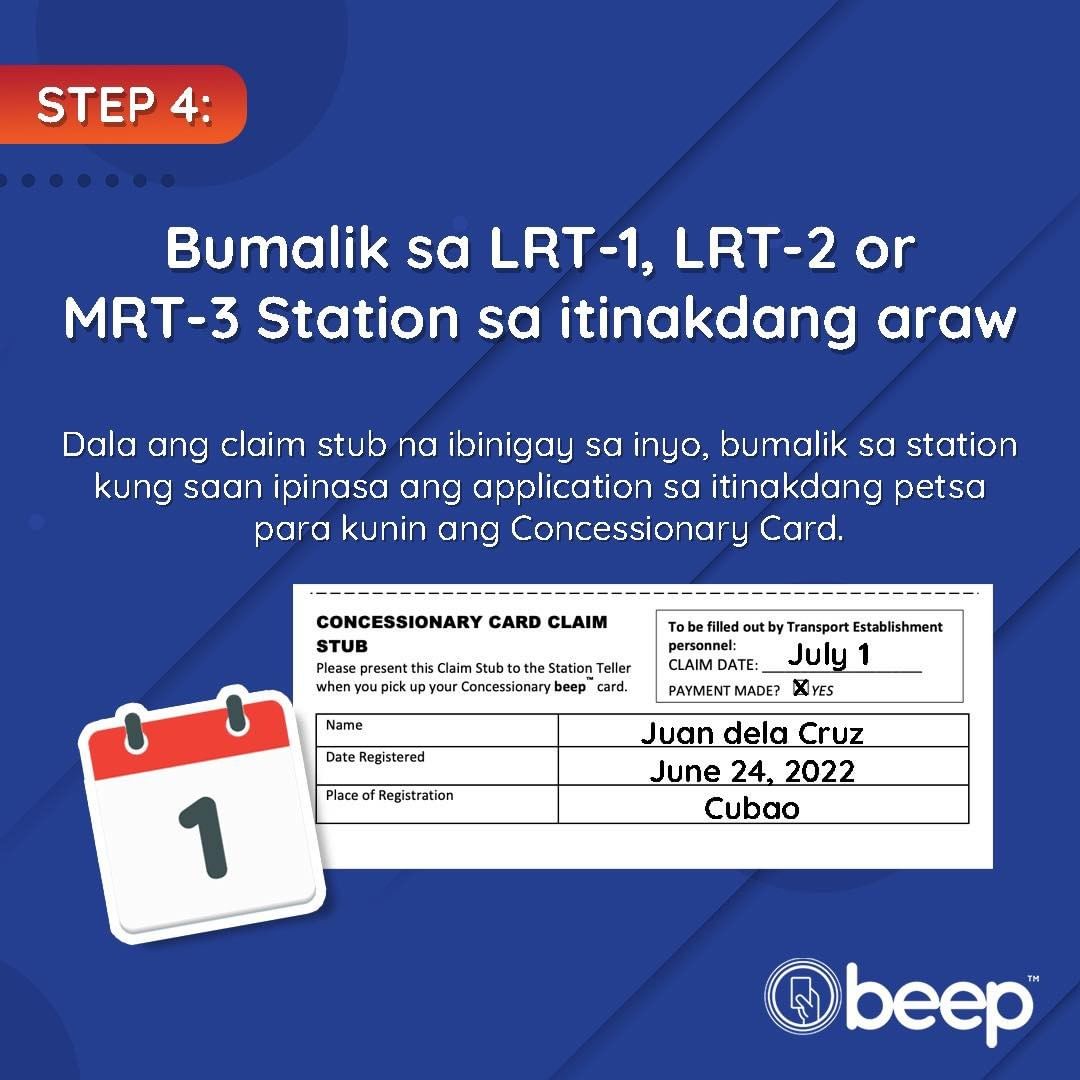
In case of system downtime or if for any reason the devices malfunction, you will be given a claim stub. Please inform our staff onsite when you plan to return so we can reserve a concessionary card for you.
Please be advised that you don’t have to wait in queue and you shall be prioritized if you present your claim stub.
No. There are no pre-registration options at this time. Applicants are advised to make a personal appearance at any of the CCCs located at any of the LRT 1, LRT 2 and MRT 3 stations to get your card on-the-spot.
Students can present their School ID (valid for the current school year) or Proof of Enrollment for the current school year. Senior Citizens or Persons with Disabilities (PWDs) can present their valid Senior Citizen or PWD ID Card (with photo) issued by their respective Local Government Units (LGUs). Alternatively, Seniors can also present any government-issued ID indicating their date of birth (to establish that they are 60 years old or over).
The applicants are requested to bring and present a physical (hard) copy of these documents to the CCCs which will be captured by the system, in accordance with relevant provisions of the Data Privacy Act of 2012 (RA 10173).
No. The process will require a personal appearance from the applicant, because the applicant’s image will be captured by the system before a concessionary beep™ card is issued.
Yes. There is a separate queue or line to the CCC. Applicants will be accommodated on a first-come, first-served basis. For a CCC location nearest you, check out our website: https://beep.com.ph/concessionary-locations/
Applicants are reminded of the following guidelines when queuing at the CCC:
(1) Upon arrival at the station, applicants are instructed to proceed to the CCC. They will then be given a queuing number (e.g., from 1 to 100) on a first-come, first-served basis.
(2) If applicants are unable to get a queuing number at a particular station on a particular day, they are requested to come back some other day or proceed to another station’s CCC to check if queuing numbers are still available for that station.
(3) Queuing numbers will be processed in batches of six (6) in 30-minute increments. For example, those who are given queuing numbers 1 to 6 will be the first batch to be processed between 8:00 to 8:30 a.m.
(4) A total of 17 batches can be accommodated within an 8-hour shift per day, based on the following estimated schedule
| Batch | Queue Numbers | Estimated Processing Schedule* |
| 1 | 1, 2, 3, 4, 5 and 6 | 8:00 to 8:30 a.m. |
| 2 | 7, 8, 9, 10, 11 and 12 | 8:30 to 9:00 a.m. |
| 3 | 13, 14, 15, 16, 17 and 18 | 9:00 to 9:30 a.m. |
| 4 | 19, 20, 21, 22, 23 and 24 | 9:30 to 10:00 a.m. |
| 5 | 25, 26, 27, 28, 29 and 30 | 10:00 to 10:30 a.m. |
| 6 | 31, 32, 33, 34, 35 and 36 | 10:30 to 11:00 a.m. |
| 7 | 37, 38, 39, 40, 41 and 42 | 11:00 to 11:30 a.m. |
| 8 | 43, 44, 45, 46, 47 and 48 | 11:30 to 12:00 nn |
| 9 | 49, 50, 51, 52, 53 and 54 | 12:00 to 12:30 p.m. |
| 10 | 55, 56, 57, 58, 59 and 60 | 12:30 to 1:00 p.m. |
| 11 | 61, 62, 63, 64, 65 and 66 | 1:00 to 1:30 p.m. |
| 12 | 67, 68, 69, 70, 71 and 72 | 1:30 to 2:00 p.m. |
| 13 | 73, 74, 75, 76, 77 and 78 | 2:00 to 2:30 p.m. |
| 14 | 79, 80, 81, 82, 83 and 84 | 2:30 to 3:00 p.m. |
| 15 | 85, 86, 87, 88, 89 and 90 | 3:00 to 3:30 p.m. |
| 16 | 91, 92, 93, 94, 95 and 96 | 3:30 to 4:00 p.m. |
| 17 | 97, 98, 99 and 100 | 4:00 to 4:30 p.m. |
*estimate only. Depending on the actual pace of processing, estimated schedule could be earlier or later or if the Concessionary Card Processor (CCP) takes a break as mandated by law.
(5) Walk-ins can only be accommodated once those with queuing numbers have been served or there are “no shows” in the batch corresponding to the processing window to which they are assigned.
(6) Applicants who may require special assistance should approach the station personnel on duty.
The CCCs are open to serve applicants from Monday to Friday, 8:00 a.m. to 5:00 p.m. and from 7:00 a.m. to 7:00 p.m. every Saturday and Sunday.
Applicants who cannot be accommodated for the day of their visit may opt to go back another day or transfer to other stations where the queue may be shorter. In the meantime, applicants who are unable to get their concessionary cards during their visit to a train station can buy a discounted Single Journey Ticket (SJT) from any of the station tellers and still be able to travel for that day.
Please note that these operating hours may still be subject to change. Watch out for notices and/or announcements on our social media channels and/or website should there be any changes in the schedule or if there are suspensions or closures due to weather conditions, operational disruptions, power outages, etc.
Aside from serving as proof that we have received your payment for the Card Issuance Fee, the Acknowledgement Receipt also indicates your agreement to (1) the terms and conditions of use of the beep™ card (https://beep.com.ph/terms-and conditions/); (2) the capturing, use and storage of personal data in accordance with the Data Privacy Act of 2012 (RA 10173); (3) the verification process to avoid any duplicates, misuse, fraud or abuse and subject to blacklisting process according to the terms and conditions of use.
Eligibility and Validation
The Concessionary Card Counters will accept new applications from Filipino Students, Seniors Citizens (aged 60 years or over) or Persons with Disabilities (PWDs).
New applicants refer to first-time applicants or those who have never applied for a beep™ concessionary card on any rail station before, provided they can show proof of their eligibility, primarily by showing a valid photo ID.
Senior Citizens and PWDs who have been previously issued concessionary beep™ cards that are still valid (i.e., the cards have not yet expired) do not have to apply for a new beep™ card. To check for validity of the card, look at the expiry date printed on the card, indicating the month and year of validity (e.g., Oct 2029). Only one concessionary card is issued per applicant at a time.
Only one concessionary card will be issued per applicant. Once issued, the card is non-transferable.
This is not encouraged. The inclusion of external images or elements aside from what is printed on the card may possibly affect the card’s full functionality. At the moment, the personalized concessionary beep™ cards will only show the name, the type of concessionary patron (Senior, Student or PWD) on the card surface and will not include a photo of the cardholder. Cardholders are reminded that their cards are non transferable.
No. The concessionary beep™ card is encoded with a discount functionality which cannot be shared with or transferred to any other type of beep™ card, including regular beep™ cards. You can let others use the standard (anonymous), “blue card” or regular beep™ card as this particular card is transferable.
No. Only one card will be issued for every concessionary patron. In the case of a student who is also a PWD, we suggest that the applicant apply for a PWD concessionary beep™ card instead, since the discount privilege on the beep™ card is valid until the card expires. The student discount is only valid for one (1) year but is renewable for every new school year (so long as the card is not yet expired).
It’s up to you if you wish to change any of your particulars, but you need to approach the station teller if you want a replacement for your concessionary beep™ card, subject to verification, processing and applicable fees. The station teller will then advise when the replacement card will be available for pick up.
Even if you change schools, you can still use the same concessionary beep™ card already issued to you and avail of the 50% fare discount for the remainder of the year when riding the trains. Please note that the discount product is valid one (1) year from its issuance. You can request for a renewal of the discount product every year during the 4-year validity of your beep™ card, subject to applicable fees.
No. Only Filipino citizens can avail of the concessionary (discount) privilege.
Yes. Provided they can show proof of Filipino citizenship and they meet the eligibility criteria for students (enrolled for the current school year) , senior citizen (by virtue of age) or PWD (declared disability).
No. A student is defined as “any Filipino citizen currently enrolled in a duly authorized elementary (grade school), secondary (high school), technical-vocational, higher education institution, or postgraduate students. The term does not include those enrolled in informal short term courses such as dancing, swimming, music and driving lessons and seminar-type courses.”
Card Issuance, Usage and Monitoring
Those who have previously applied using the manual process but have not yet received their Concessionary beep™ Cards can follow up on status at the station where the application was lodged and arrange for pick up. Alternatively, applicants can call the beep™ service desk to confirm status of their application.
Until further notice, each Concessionary Card Counter (CCC) will have 100 cards on hand every weekday, distributed as follows: 80 Student Cards, 10 Senior Citizen cards and 10 Person With Disability (PWD) cards. Mindful of the overwhelming demand and clamor from applicants at this time, particularly from students, we are working closely with our vendors to augment the current stock and sustain a more stable card supply at the stations.
Those who cannot be accommodated by a particular station on a particular day are requested to visit another train station or come back another day in order to be issued their own concessionary beep™ card. While waiting to have their own card, applicants can still buy discounted Single Journey Tickets from the station tellers to ride the trains.
Meanwhile, please stand by for any new updates on card allocations on our website and social media channels.
Applicants can go to any station at LRT 1, LRT 2 or MRT 3 to get their concessionary beep™ card. However, please be reminded that applicants will be accommodated on a first-come, first-served basis and based on available queuing slots for the day. Applicants are encouraged to visit stations with lower volume of passengers for a better chance of getting their concessionary cards on the day of their visit.
The Concessionary Card Counters will have a way to check for duplicate entries through the Concessionary Card database or master list. If there are duplicate or existing entries, the applicant will be informed accordingly and will be advised on what steps to take next.
There is no dedicated gate/turnstile for concessionary beep™ cardholders. They can enter / exit through any of the gates, except for selected “GCash” gates at MRT 3 stations (which are presently being used as a Proof of Concept or POC study).
Once issued, the concessionary beep™ card will be ready for use, provided there is enough load for their train journey. Cardholders are reminded to load their beep™ card with their desired amount through any of the station tellers, on Ticket Vending Machines (TVMs) or through the beep™ mobile application (or beep™ app).
Please approach any station teller at any train station to assist in verifying the status of the card, including the discount product on the card. Alternatively, you can call our beep™ service desk and report your concern if you cannot visit a train station right away.
Once you have downloaded the beep™ mobile application, just follow these simple steps:
Step 1: Go to <My Card> tab.
Step 2: Select the beep™ card you wish to enroll in beep™ rewards. Step 3: Swipe the selected beep™ card to the left.
Step 4: Tap the “eye” icon to view details.
Step 5: On the <Transaction> screen, tap the three dots (…) found at the upper right corner.
Step 6 (Optional): Tap <Enroll to Rewards>
Step 7: Accept the Terms and Conditions.
Step 8: A “Congratulations” message will be displayed on screen after a successful enrolment of your card.
You can now check your if your concessionary beep™ card is already reflected on your beep™ app.
You may not check / monitor your balance transactions online without the beep™ app.
Alternatively, you may check your card’s balance by proceeding to any Ticket Vending Machines (TVM) & E-Load stations found in LRT 1, LRT 2, and MRT 3 Stations.
The system can monitor card transactions (e.g., entry or exit on the gates, or card top-up or loading) but it cannot determine if somebody else other than the card owner is physically using it.
Owners of the concessionary beep™ cards are reminded not to let others use it or else face penalties and/or sanctions, as listed in Penalties for Abuse/Misuse of Concessionary Card, for any unauthorized use.
The personalized concessionary beep™ cards issued to students will have the same white color as that of cards issued to Senior Citizens and PWDs to distinguish them from the blue-colored regular, standard anonymous beep™ card. In addition, the indicator light on the gates will show a yellow green color when a concessionary beep™ card is tapped on the reader. Meanwhile, when a standard anonymous beep™ card is tapped on the same gate reader, the indicator light will show a green color.
First, you should call our beep™ service desk to report if you card is lost, stolen or damaged and you wish to request for a refund. Just provide your full name and if available, the 16-digit Card Account Number (CAN) printed on the card. Once verified, we will then proceed to blacklisting the card you reported.
We will blacklist your Concessionary beep™ Card within twelve (12) hours from the time we receive your request for blacklisting, provided that such a request was made before 4:00 PM or within thirty-six (36) hours if the request was made after 4:00 PM. Once blocked, whatever remaining value on your card is protected and guaranteed. We will reimburse you within seven (7) calendar days should there be any unauthorized transactions on your card after the twelve (12) or thirty-six (36) hour period, as applicable.
Should you wish to transfer any remaining balance from your lost or damaged Concessionary beep™ Card to a replacement beep™ Card, you may send us a request, subject to the terms and conditions and applicable Service Fees available at: https://beep.com.ph/terms-and-conditions/.
Certainly. You can use your beep™ card on any of the following modes of transport:
(1) Buses:
- BGC Bus (Taguig/Makati)
- Precious Grace Transport (PGT) (Bulacan-Metro Manila)
- Clark Development Corp (CDC) (Pampanga)
- San Agustin Transport (Cavite-Metro Manila)
- TAS Trans (Metro Manila)
- Davao Metro Shuttle (DMS) (Davao)
- UBE Express (Parañaque)
(2) Jeepneys / PUVMP:
- Nobablum (Novaliches-Balintawak-Blumentritt)
- Lungsod Silangan Transport Service (Antipolo)
- Bulusan Transport Service Coop (Sorsogon)
CONCESSIONARY CARD ISSUANCE FAQs Page 10 of 14
- Diamond Transport Service Coop (DATSCO) (Butuan)
- Amoec Transport (Northern Samar)
- MBMJ Transport Services (Bacolod)
beep™ cards are also accepted in selected retail establishments such as: • Uncle John’s Convenience Stores
- Phoenix Petroleum
- KFC (selected branches only)
- Prince Hypermart (Cebu and Dumaguete)
- Prince Tower (Cebu)
Note: For retail establishments, please confirm with the sales person on duty if they accept beep™ cards before you pay.
Yes, discounted Single Journey Tickets are still available at LRT 1, LRT 2, and MRT 3 stations, especially if you have not secured your Concessionary beep™ Cards yet.
Validity / Expiration / Extension
This is to ensure that each beep™ card is maintained to its optimum use up to its expiration date (printed on the back of the card) or to a maximum of fifty thousand transactions (50,000) whichever comes first.
The one (1) year validity of the discount product on the student beep™ cards is to ensure that the discount privilege is granted to coincide with each school year that the student is enrolled. The discount privilege is renewable every year so long as the beep™ card is valid for use. The student should just present a valid School ID or proof of enrollment for the current school year to renew the discount product, subject to applicable fees.
The validity date of any beep™ card may be extended by one (1) year only (12 consecutive months) upon successful transaction in a beep™ Express Renewal terminals found in LRT 1, LRT 2, or MRT 3 stations. Once the extension process is successful, you will get a printed receipt indicating the new expiry date of your beep™ card.
AFPI reserves the right to charge a minimal fee for extending the expiry date of the card and to change the parameters for card expiry extension, as the situation warrants.
Please note that the extension can only be done once. For more details on the terms and conditions of use: https://beep.com.ph/terms-and-conditions/
You cannot transfer the regular (blue) beep™ card balance to your concessionary (white) beep™ card as they are separate products.
You may transfer the load of your old concessionary card to your new one for a fee of P150, just approach any of the LRT 1, LRT 2, and MRT 3 station tellers for additional assistance.
Any remaining balance on an expired card can be transferred to a new card anytime within twelve (12) months after the expiry date. (For example, if the card is expiring on July 31, 2019, they have until July 31, 2020 to transfer the balance from the old card to a new card). A transfer of balance fee of One Hundred Fifty Pesos (P150.00) will be charged to the cardholder. After this 12-month grace period, any remaining balance on the expired card will be forfeited.
Those with expired concessionary beep™ cards would need to go to the station teller, surrender the expired card and request for a replacement. Since their particulars have already been captured in the database, the station teller will acknowledge the customer’s replacement request and endorse the application to AF Payments Inc. (AFPI) for processing. The customer would need to wait and return to the station once the replacement card is available.
Please note that the station teller will advise when the replacement card will be ready for pick up (subject to applicable fees).
Renewal / Lost Cards
Customers who have their concessionary cards lost, misplaced or stolen should approach the station teller and request for a replacement. Once reported, the station teller shall proceed with blacklisting the card. Thereafter, they will need to fill out a form and follow the instructions and guidance as to when a replacement card will be released, subject to applicable fees.
Please note that requests for replacement are subject for verification and validation. Concessionary cards that have been reported lost, misplaced or stolen which are tagged as “Blacklisted” can no longer be used as fare media. Until a replacement card is issued, customers can buy a discounted Single Journey Ticket in order to continue riding the trains and avail of discounted fares.
Students can avail of the 50% fare discount within one (1) year from issuance of the card. Afterwards, students can approach any of the station tellers and follow their instructions on how to renew the discount product on their concessionary beep™ card subject to applicable fees.
Students are reminded that their concessionary beep™ cards are valid for use for four (4) years, after which they have the option to extend for one (1) more year, subject to certain conditions or request for a replacement concessionary beep™ card, details of which are available on our website: https://beep.com.ph/terms-and-conditions/.
The validity of Senior Citizen/PWD discounts are applicable for lifetime, unlike Student Discount beep™ Cards. Hence, as long as the Concessionary Card is valid, the 50% fare discount is also valid.
You can report your lost/stolen or misplaced card at any of the stations and follow the card replacement process or you can call the beep™ service desk.
Immediately report any instance of lost/stolen Concessionary Cards in order to protect the current balance of your card.
Penalties for Abuse/Misuse of Concessionary Card
Those caught abusing or misusing concessionary beep™ cards will have the card confiscated and be subject to the following sanctions:
CONCESSIONARY CARD ISSUANCE FAQs Page 13 of 14
1st Offense: Issuance of Stern warning
2nd Offense: Penalty of Three Hundred Pesos (PHP 300.00)
3rd Offense: Penalty of Five Hundred Pesos (PHP 500.00)
The offender will likewise be subject to further sanction(s) and penalt(ies), if any, as enforced, by the Local Government Unit (LGU) that issued the ID or as may be provided by law.
beep™ Service Desk Hotline and Contact Information
For any beep™-card related concerns you can contact the beep™ Service Desk (BSD) daily (Monday to Sunday, including holidays) from 5:00 a.m. to 11:00 p.m. on any of the following numbers: Landline: (02) 8737 -9600 or (02) 8737-9622; Viber Numbers: 0998-581-9675 (Smart) or 0917-512-1319 (Globe);
You can also send your queries via e-mail: customer.info@afpayments.com
Para sa karagdagang impormasyon, I-click lang ang sumusunod na pages:
Requirements
Step-by-Step Process
Frequently Asked Questions (FAQs)
Card Conditions of Use
Concessionary Card Counter Locations
Ilang Paalala sa mga Applicants
Frequently Asked Questions (FAQs) About the beep™
Stored Value Updater (SVU) Device
(as of 01 October 2025)
Note: For purposes Concessionary beep™ Card, Concessionary Card, White beep™ Card and Discount beep™ Card are accorded the same meaning and refers to the contactless Stored Value Card (SVC) or fare media bearing the discount for eligible patrons.
- LRT 1 Stations – Fernando Poe Jr., Doroteo Jose, (southbound), Central Terminal, EDSA (northbound), Dr. Santos
- LRT 2 Stations – Recto, Legarda, Araneta Center-Cubao, Marikina-Pasig, Antipolo
- MRT 3 Stations – North Avenue (southbound), Araneta Center-Cubao, Shaw Boulevard (Building A), Ayala, Taft
- NFC stands for Near-Field Communication, a technology that supports contactless payments by allowing two devices (in this case, your phone and your beep™ card) to communicate with each other by sending data in close proximity. You can search online to check if your smartphone model is NFC-enabled. Or, you can go to your phone’s settings and search “NFC”. For Android devices, the NFC reader is near the back camera. For iPhone devices, the NFC reader is at the front camera.
- If you don’t have an NFC-enabled phone, you need to tap your beep™ card in the SVU to fetch your pending load.
- Please wait for 15-30 minutes after you purchased load via Maya/BPI/GCash to fetch the load via SVU.
- It usually takes 15-30 minutes for pending load to be available in the SVU device. If more than 30 minutes has passed from the time you made the request, check if your source account or e-wallet has been debited. If yes, please call the OTA loading partner’s Customer Service to report the issue.
- Yes, you may but you will have to wait for 30 minutes for your load to be fetched.
- Please call the beep™ Customer Service Desk (5:00 AM to 11:00 PM daily) at (02) 8737-9600 | (02) 8737-9622 | +63 917 512 1319 |
+63 998 581 9675 to report the incident and get assistance.
- Please call the beep™ Customer Service Desk (5:00 AM to 11:00 PM daily) at (02) 8737-9600 | (02) 8737-9622 | +63 917 512 1319 |
+63 998 581 9675 to report the incident and get assistance.
- Your pending load can be fetched via SVU any time within 180 days.